

Shoppable recipes are interactive digital culinary cards that connect listed ingredients directly to ecommerce products. For example, here’s one created using KL - Recipe Studio in Shopify.
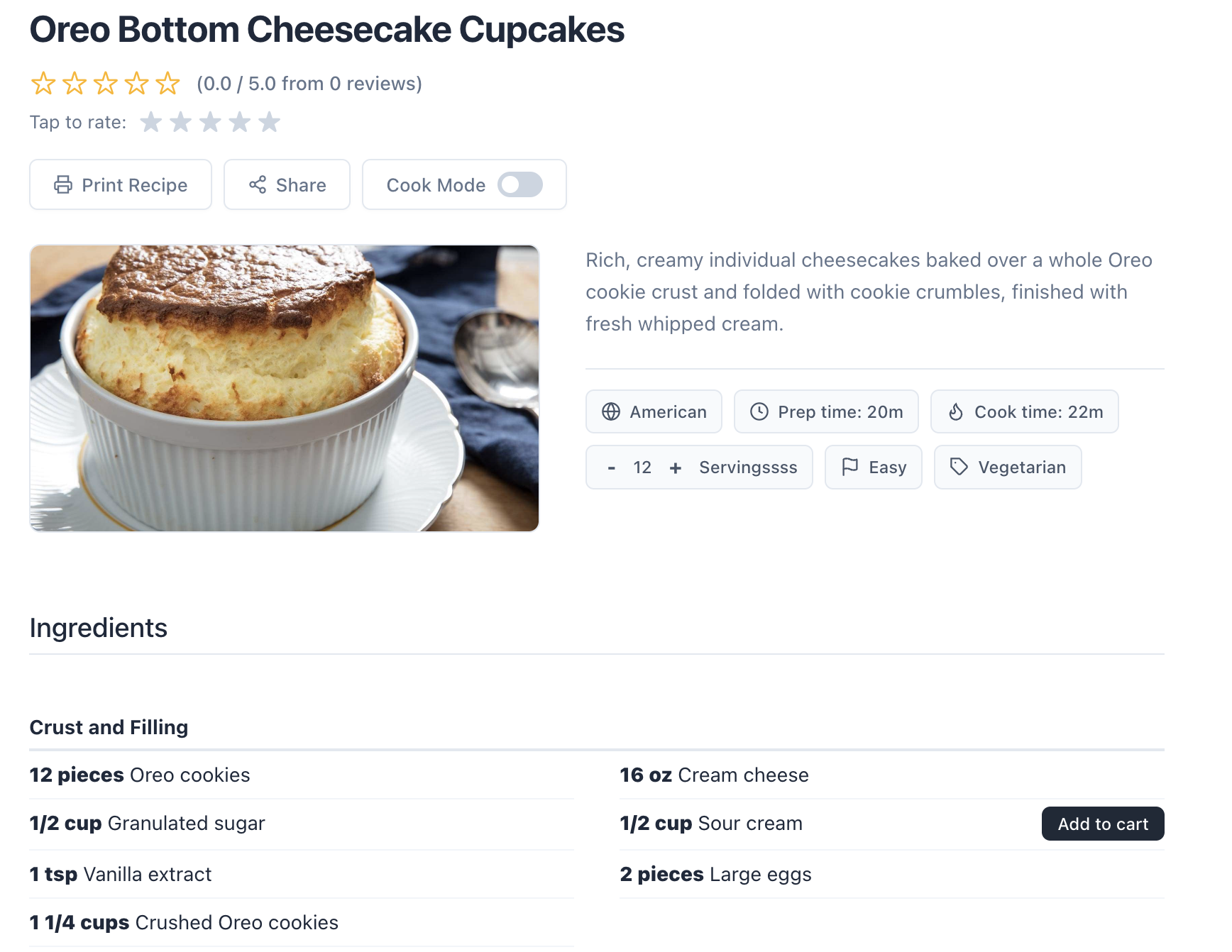
Instead of manually searching for items, readers can add individual ingredients or an entire bundle to their online shopping cart with a single click, turning routine food content into instant sales.
What makes a recipe shoppable?
Standard online recipes provide instructions and ingredient lists, but leave the buying process entirely up to the customer. Readers must write down items, switch tabs, search an online store, find matching sizes, and add each item one by one. This high-friction flow causes massive drop-off.
A shoppable recipe removes this friction completely by transforming passive culinary content into a frictionless storefront experience:
- Direct Variant Mapping: Each listed ingredient links to a specific product and variant (e.g., Organic Extra Virgin Olive Oil – 500ml).
- 1-Click “Add All to Cart”: Shoppers can add every ingredient required for the meal straight into their cart with a single tap, with built-in stock checks that prevent ordering sold-out items.
- Serving Scaler Integration: When readers adjust servings from 2 to 4, the ingredient quantities and cart additions scale dynamically.
How to sell ingredients through shoppable recipes in Shopify?
While Shopify has a native blogging engine, default blog posts only render static text and images. To turn your recipes into shoppable conversion engines, you can use a specialized Shopify recipe app.
To get started, install the KL - Recipe Studio app in your Shopify store. Then, complete the onboarding process by selecting the blog and adding the recipe blocks to your theme.
Step 1: Create a recipe
Now, in the app dashboard, start by creating a new recipe. You’ll get three methods:
- Manual Way: Use this to create recipe content manually. You’ll need to enter title, description, ingredients, steps, and other details.
- AI Recipe Generator: Enter a prompt (e.g., “Quick 20-minute spicy sesame garlic noodles”), and generative AI will output structured prep times, cook times, nutrition facts, ingredients, and instructions.
- Web Import: Paste an existing recipe link from your old blog or website; the app will scrape the directions, parse quantities, and sync featured images directly to your Shopify store.
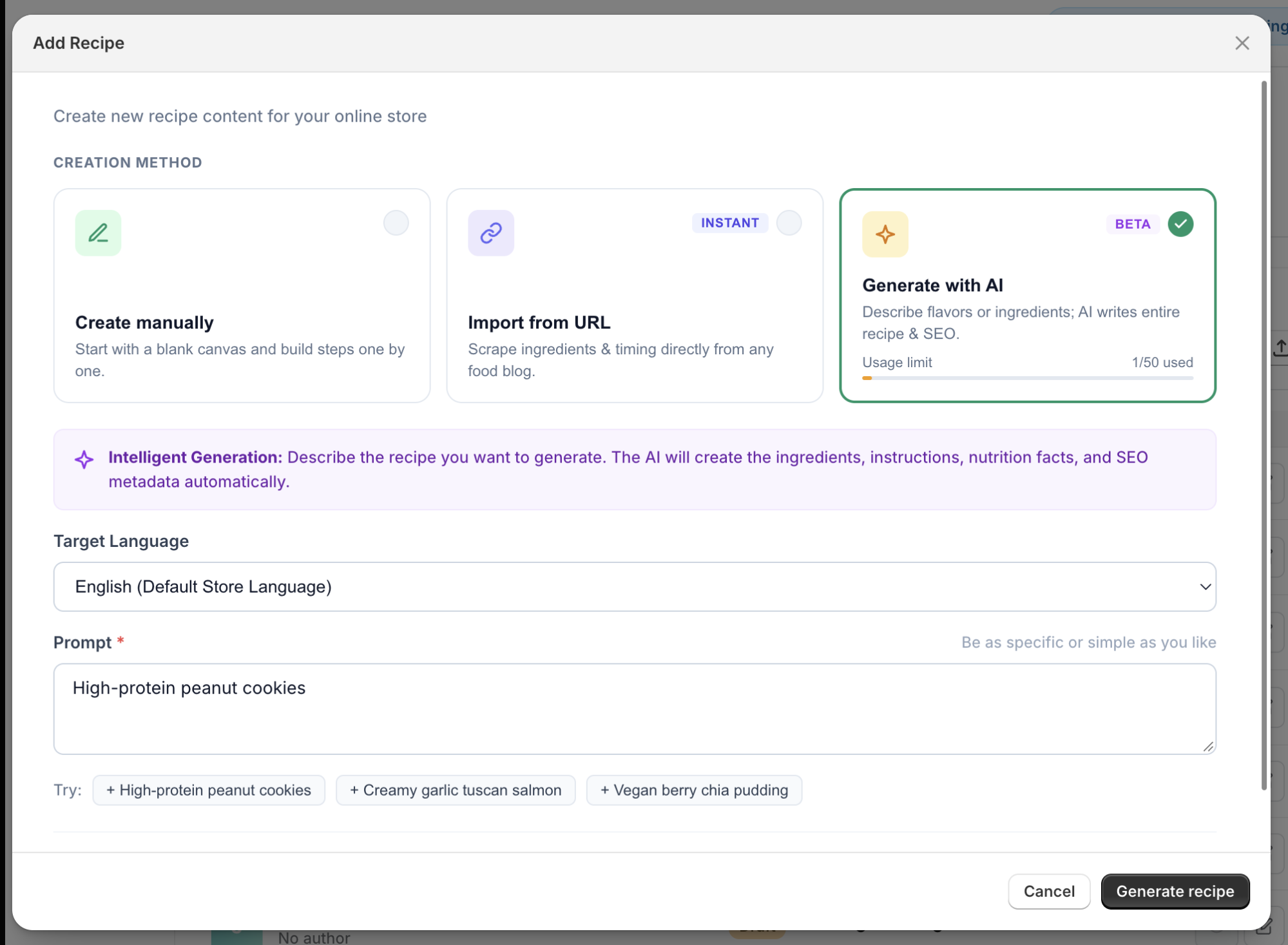
Choose the one suitable for you and create a recipe draft.
Step 2: Link ingredients to products
Once the recipe is created, you can link the ingredients to your store products. To do so, click the product icon against each ingredient, search for the product in your store, and select the specific variant you want to link.
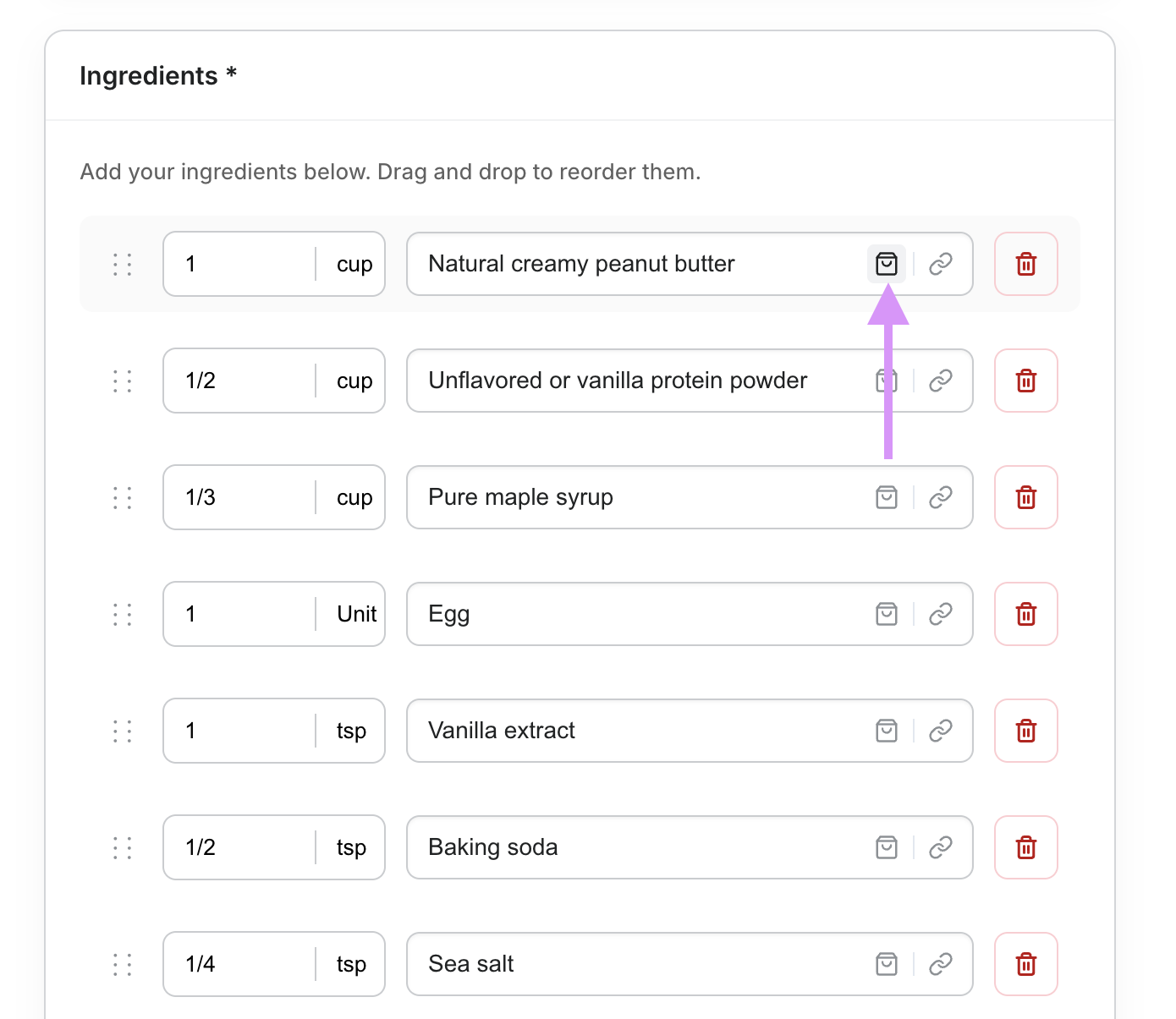
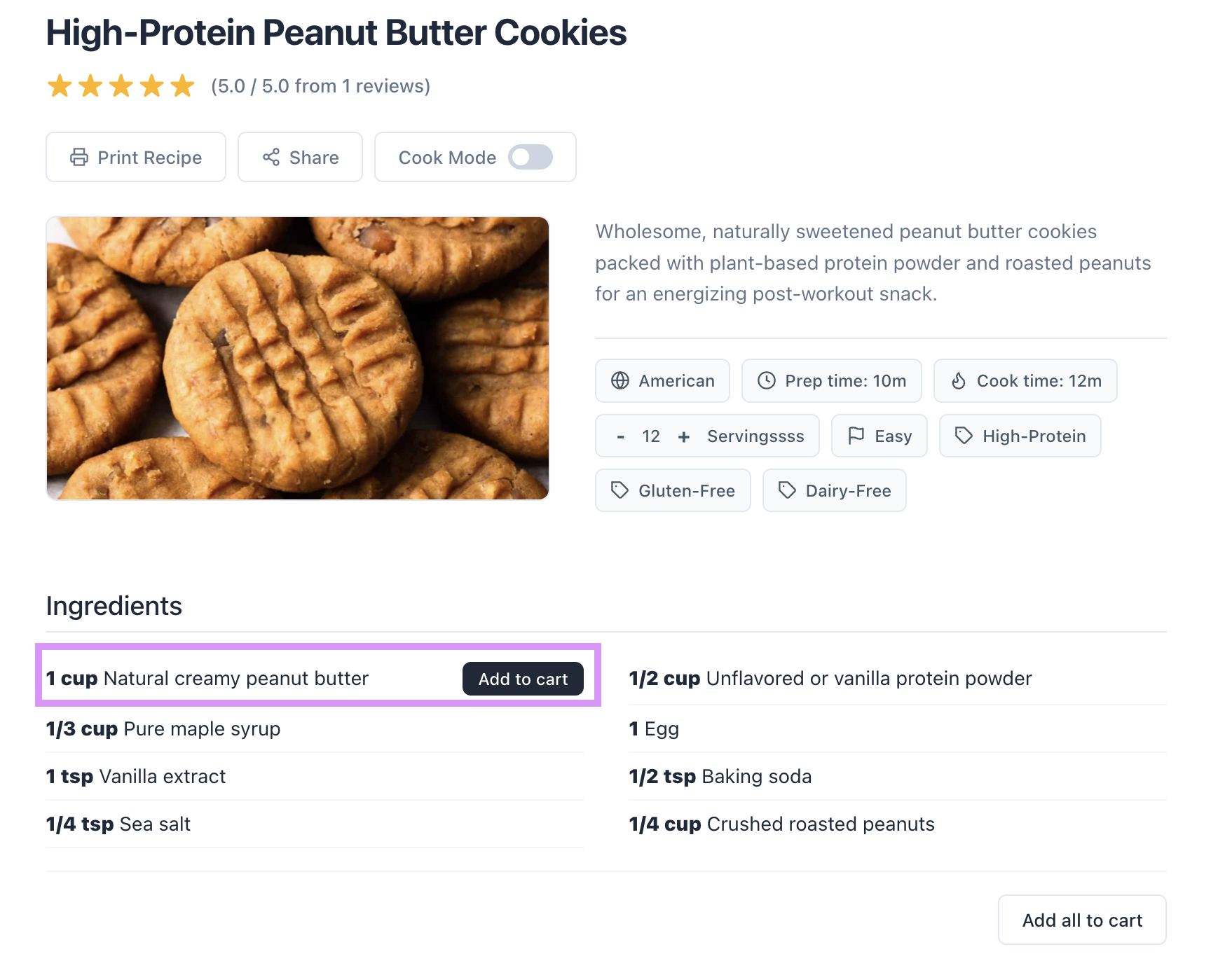
Linking a product variant to an ingredient will show an “add to cart” button against that ingredient on the recipe blog, making it easy for customers to buy with a click.
Once the products are linked, add an image to the recipe and publish it.
For example, here’s what the linked product looks like on the frontend.
Step 3: Track performance
After publishing, you can monitor your content's commercial impact. The analytics dashboard helps you track total views, ingredient clicks, click-through rates (CTR), and average order value additions.
The analytics also shows day-wise trends of these metrics to analyze performance over time.
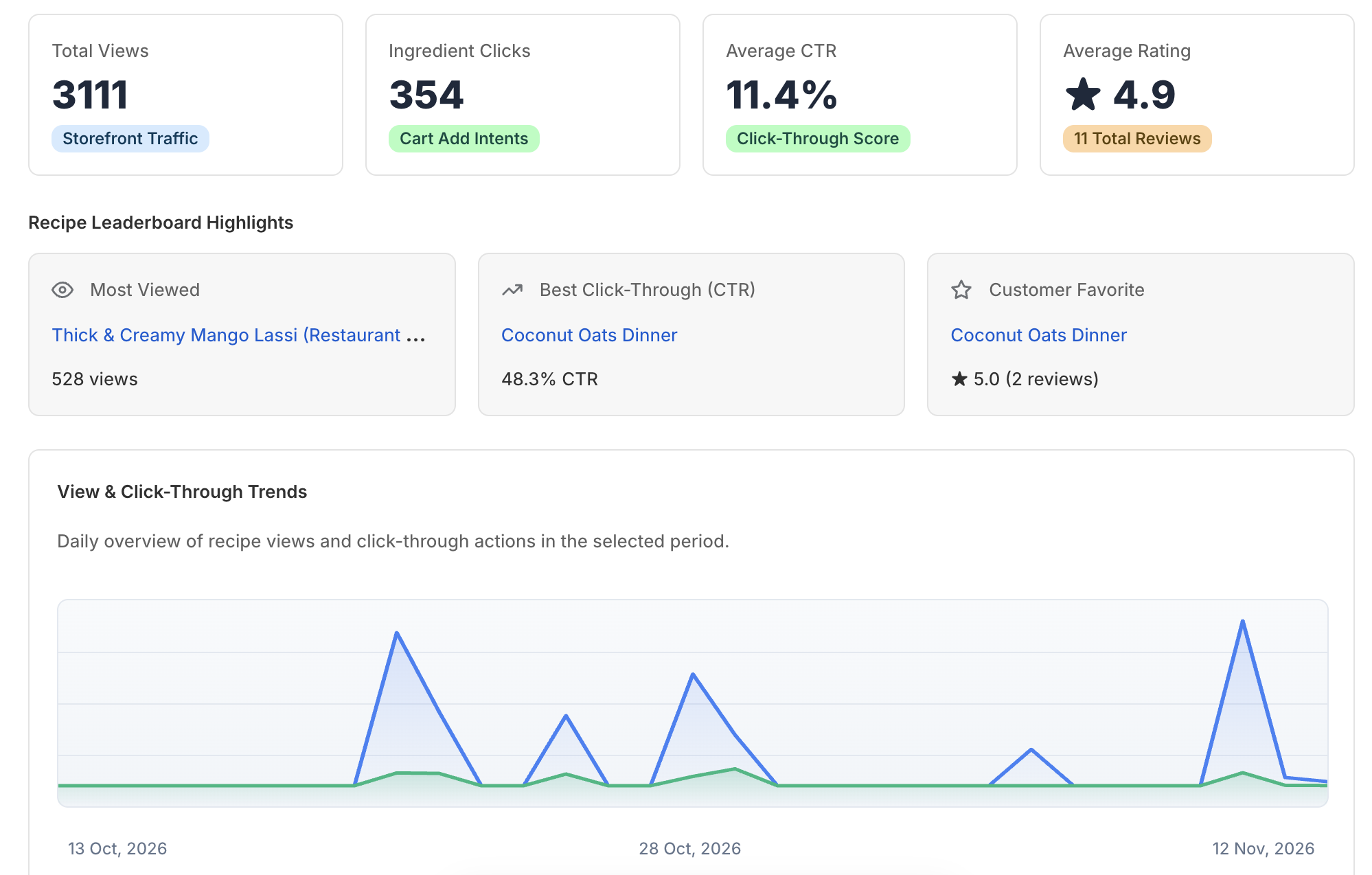
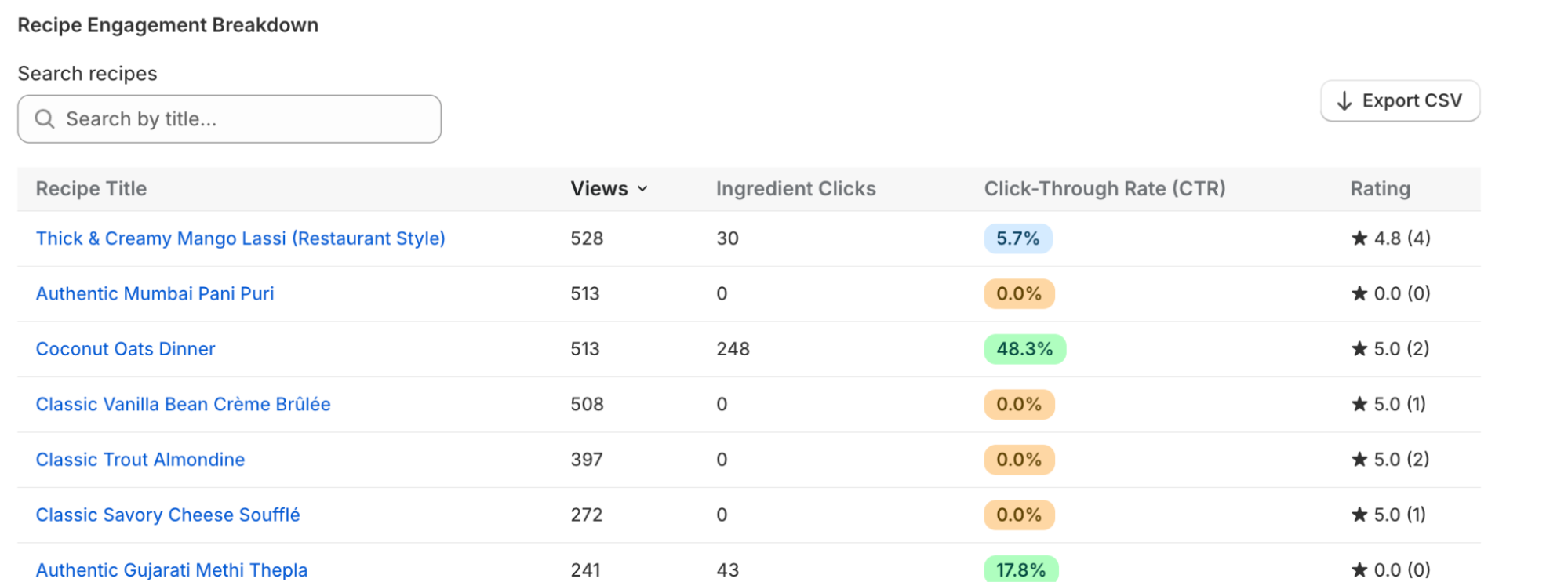
Further, you can track metrics for each of the published recipes to find out what’s working well in your content strategy and double down on high-performing dishes.
Notable features of KL - Recipe Studio app
KL - Recipe Studio is designed specifically to help food, grocery, spice, and kitchenware merchants turn culinary inspiration into revenue. Key capabilities include:
AI generation & import from web
Building a library of recipes doesn't have to take weeks. With built-in AI, you can generate fully formatted recipes, complete with dietary tags, difficulty levels, and calorie counts, in seconds.
If you already have recipes on another blog or site, the 1-click URL importer extracts all content and uploads assets to your Shopify store.
Rich schema markup
The app automatically generates recipe schema markup (JSON-LD structured data) that qualifies your blog posts for Google’s recipe rich snippets. It helps to display star ratings, cook time, calories, and preview images directly on Google search results to maximize organic clicks.
Recipe book PDF export
You can export individual recipes, specific categories (e.g., Holiday Desserts), or their entire recipe collection into clean, branded, print-ready PDF cookbooks. These make great downloadable lead magnets for email capture or printable inserts for physical product shipments.
In-depth analytics
The app features a dedicated analytics dashboard tracking views, individual ingredient clicks, and add-to-cart conversion rates across all published recipes. You can review daily performance trends, identify your top-converting recipes, and export full reports via CSV.
FAQs
How to use AI to generate recipes in Shopify?
In KL - Recipe Studio, open the Add Recipe modal and select AI Write. Type a short culinary concept, such as “Keto gluten-free almond flour pizza crust”. The AI will instantly craft an entire recipe with measured ingredients, cook times, step-by-step instructions, and nutritional estimates ready for you to review and publish.
What is the best recipe blog app in Shopify?
KL - Recipe Studio is built specifically for modern Shopify stores. It offers shoppable ingredients, multi-tiered category filtering, native theme app blocks, automated SEO Schema, and cross-sell blocks that display recipe ideas directly on product detail pages.
What is the recipe schema markup code?
Recipe Schema markup (JSON-LD) is standardized structured code placed on a webpage that tells search engines like Google that the page contains a recipe. It specifies details like cook time, ingredients, author, and ratings. Search engines use this code to generate rich search cards with photos and star ratings on Google Search and Google Images.
Does Shopify support shoppable recipes?
Shopify does not have shoppable recipe functionality out of the box; native blog posts only support standard text and images. However, by installing a recipe app like KL - Recipe Studio, you can add shoppable recipe blocks with “Add All to Cart” buttons directly to your store.
Scale sales with shoppable recipes
Recipes are among the highest-traffic, most shared forms of content on the internet. For food, beverage, and kitchenware brands, they represent an untapped sales channel.
By making recipes shoppable, you eliminate buying hurdles, deliver real culinary value, and create a direct path from discovery to checkout. Transform your store's blog from a simple reading corner into your highest-converting sales funnel today.